
Personalize Your Chrome Dashboard Today
Overview
Atlas redefines the Chrome new tab experience by replacing the default page with a customizable personal dashboard. Designed for users seeking greater control and personalization, it transforms a simple browser interface into a dynamic workspace. The software enables users to upload custom images and audio files as backgrounds, offering a unique visual and auditory environment each time they open a new tab. This makes it ideal for professionals, students, and creatives who want a tailored digital space that reflects their workflow and aesthetic preferences.
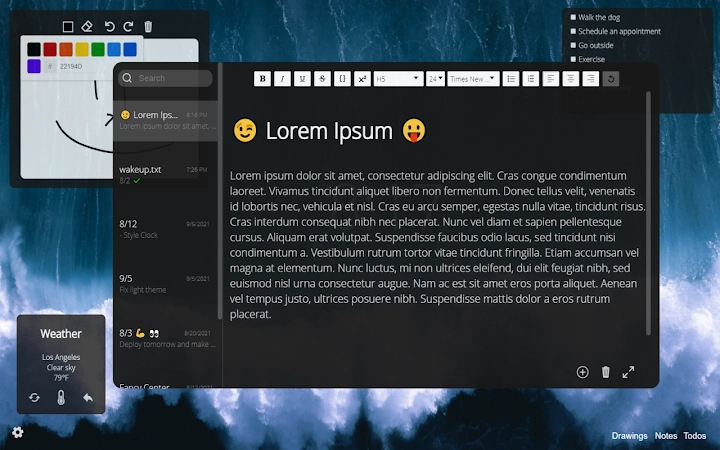
Key functionalities include moveable containers, auto-saving notes with rich text editing, a drawing board, a weather widget, and a customizable to-do list. These features support productivity, creativity, and daily planning. Data is synchronized across multiple devices, ensuring continuity whether users are working from a desktop, laptop, or tablet. The inclusion of a daily rotating high-quality background adds a fresh, inspiring touch without requiring manual updates.
As a Chrome extension, Atlas operates within the browser environment, making it accessible without complex installation. The developer did not provide additional details about their background or company. The software is updated regularly, suggesting ongoing support and responsiveness to user needs. Real-world applications include daily task management, visual inspiration, quick note-taking, and a personalized digital workspace that enhances focus and motivation.
Key Features & Capabilities
- Custom Backgrounds: Upload personal images (PNG/JPEG) or audio files (MP3) to set your own visual or auditory theme.
- Moveable Containers: All dashboard elements can be freely repositioned across the screen for optimal layout control.
- Auto-Saving Notes: A full-featured text editor supports font changes, sizes, and formatting, with automatic saving to prevent data loss.
- Drawing Board: A built-in canvas for quick sketches, brainstorming, or visual planning, with auto-save functionality.
- Multi-Device Sync: Saved data, including notes, to-do lists, and settings, is available across all devices where the extension is installed.
- Weather Widget: Displays real-time local weather information for convenient planning.
- Custom Greeting Message: Set a personalized welcome message that appears each time the new tab is opened.
- To-Do List: Track daily tasks with a simple, intuitive interface that persists across sessions.
- Light/Dark Theme Toggle: Switch between themes to match your environment or preference.
- Daily Background Rotation: Automatically changes to a high-quality image each day if no custom media is selected.
These features collectively create a cohesive, user-driven environment. For example, a student might use the drawing board for sketching ideas, the to-do list for assignments, and custom background images to stay motivated. A professional could set a calming audio track, use the weather widget for travel planning, and manage tasks through the note editor. The auto-saving mechanism ensures that no progress is lost, even during unexpected interruptions.
User Interface, Workflow & Performance
The user interface of Atlas is designed with simplicity and flexibility in mind. The dashboard presents a clean, uncluttered layout where all elements—notes, to-do lists, widgets, and media—are displayed as draggable containers. Navigation is intuitive, relying on direct manipulation: users can click and drag any component to reposition it, resize it, or rearrange the layout to suit their workflow.
Workflow efficiency is enhanced by the auto-saving nature of all content. Users do not need to manually save notes or drawings, reducing cognitive load and minimizing the risk of data loss. The interface responds promptly to user input, suggesting smooth performance under typical usage conditions. However, exact performance details were not specified by the developer.
Stability appears to be maintained through regular updates, though specific crash or error reports were not provided. Resource usage behavior, such as CPU or RAM consumption, was not disclosed. Based on general software behavior patterns, lightweight extensions like Atlas typically have minimal impact on system performance. The software operates entirely within the Chrome environment, which may influence its responsiveness depending on browser load and other active extensions.
Compatibility & System Requirements
Atlas is compatible with Windows, Mac, and Linux operating systems, making it accessible to a broad range of users regardless of their preferred platform. It functions as a Chrome extension, meaning it requires the Google Chrome browser to operate. The installation size is 2.5 MB, indicating a lightweight footprint that should not strain storage resources.
Exact system requirements were not listed by the developer. This includes details on minimum RAM, processor speed, or browser version compatibility. Users should ensure they are running a current version of Chrome to avoid potential issues. Platform compatibility information is limited to the supported operating systems, with no mention of tablet or mobile support. The software does not require administrator privileges for installation, which simplifies deployment across personal and work devices.
Pros and Cons
Pros
- Highly customizable interface with moveable, resizable containers
- Auto-saving functionality for notes and drawings ensures data integrity
- Supports multiple media types including images and audio files
- Syncs data across devices for seamless continuity
- Lightweight at only 2.5 MB in size
- Offers a daily background rotation for visual refresh
- Free to use with no ads or paywalls
- Regular updates indicate active development and support
Cons
- No detailed system requirements provided
- Performance metrics such as CPU or RAM usage were not disclosed
- Requires Google Chrome to function, limiting use on other browsers
- Advanced features are locked behind a $1/month premium subscription
- No offline mode mentioned for data access
FAQ Section
Is Atlas compatible with all browsers?
Atlas is designed specifically as a Chrome extension and requires Google Chrome to function. It is not currently compatible with other browsers such as Firefox, Edge, or Safari.
Is the software safe to use?
As a Chrome extension, Atlas operates within the browser’s security model. It does not request access to sensitive system data. However, users should only install extensions from trusted sources. The developer has not provided a public privacy policy.
How often are updates released?
Atlas is actively maintained and updated regularly. The developer has indicated ongoing improvements, though specific update frequency was not disclosed.
Can I use Atlas without an internet connection?
While the extension requires an internet connection to sync data across devices and access certain widgets like weather, core features such as notes and the drawing board may function offline. However, exact offline capabilities were not specified.
What happens to my data if I uninstall the extension?
Data stored within the extension is saved to the user’s Chrome account. If the extension is uninstalled, data may be lost unless backed up. Users are advised to export or save important content manually.
Final Thoughts + CTA
Atlas delivers a powerful and refreshing alternative to the standard Chrome new tab page. Its blend of personalization, productivity tools, and cross-device synchronization makes it a standout choice for users who want more from their browser interface. The ability to upload custom media, move containers freely, and auto-save content enhances both usability and creativity.
While some technical details are missing, the software’s lightweight design, regular updates, and free availability make it a compelling option for students, remote workers, and digital creatives. The premium features offer added value, but the core experience remains robust and fully functional at no cost.
For anyone looking to transform their browsing experience into a personalized, efficient workspace, Atlas is a must-try. Download Atlas Dashboard now.







